 Martillolaud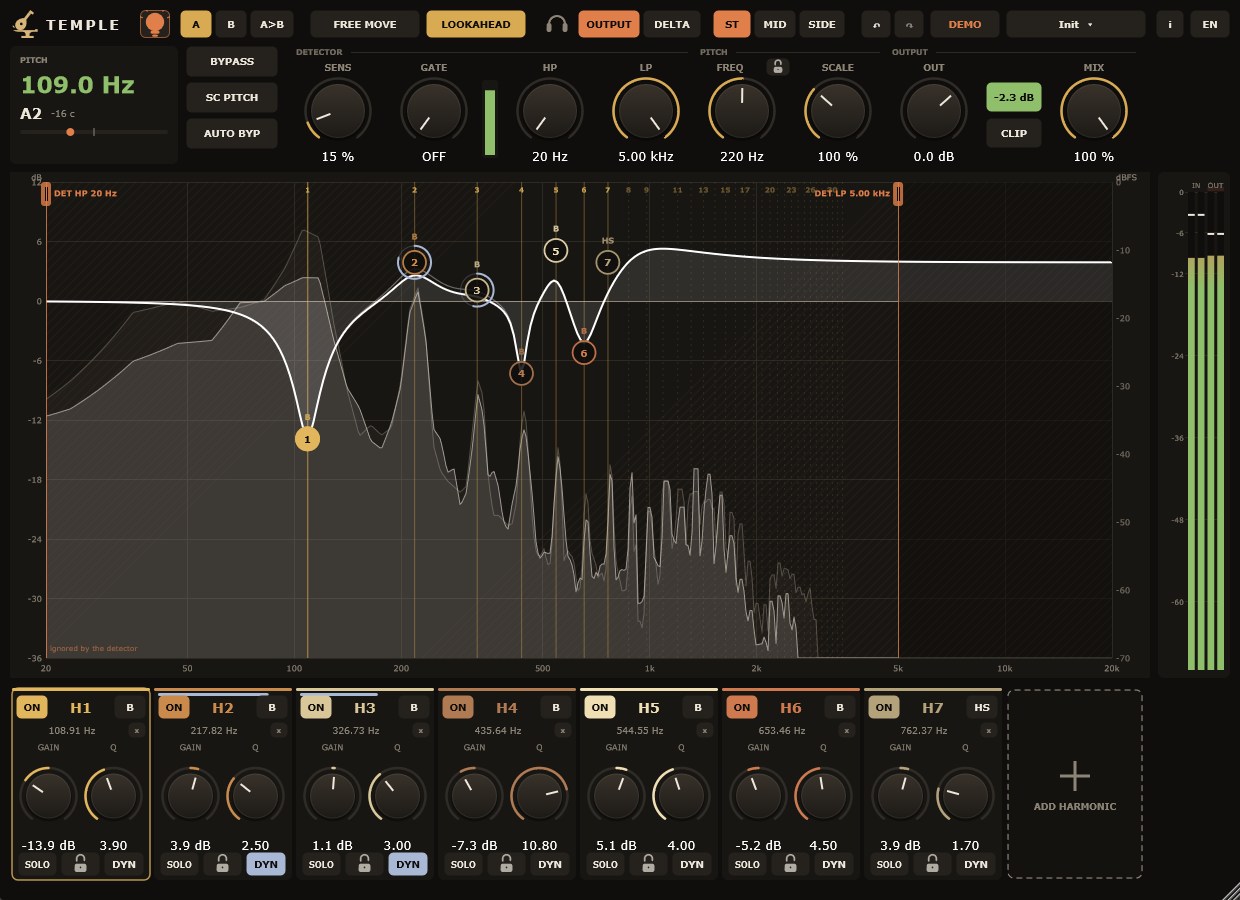
InstalaciónInstallation
- Descarga
Temple-Windows.zipy descomprímelo. - Copia
Temple.vst3enC:\Program Files\Common Files\VST3. - Abre tu DAW y vuelve a buscar plugins si no aparece. Temple está bajo el fabricante Martillolaud.
- Download
Temple-Windows.zipand unzip it. - Copy
Temple.vst3toC:\Program Files\Common Files\VST3. - Open your DAW and rescan plugins if it does not show up. Temple is listed under the manufacturer Martillolaud.
Activar la licenciaActivating your license
Sin licencia, Temple funciona completo. Al abrir la ventana sale un aviso que se puede cerrar a los 10 segundos, una vez por instancia. Para quitarlo:
Without a license Temple is fully working. Opening its window shows a notice you can close after 10 seconds, once per instance. To remove it:
- Pulsa DEMO en la barra superior.
- Escribe el correo con el que compraste y la serie que te llegó por email.
- Listo. No hace falta internet: la serie se comprueba en tu ordenador.
- Click DEMO in the top bar.
- Enter the email you bought with and the serial you received.
- Done. No internet needed: the serial is checked on your computer.
Cómo funcionaHow it works
Temple escucha la pista, encuentra la nota que suena (su fundamental, f0) y coloca cada banda en f0 multiplicado por un número: ×1 es la fundamental, ×2 la octava, ×3 la quinta de encima, y así. Cuando cambia la nota, todas las bandas se mueven con ella.
Temple listens to the track, finds the note being played (its fundamental, f0) and places each band at f0 times a number: ×1 is the fundamental, ×2 the octave, ×3 the fifth above, and so on. When the note changes, every band moves with it.
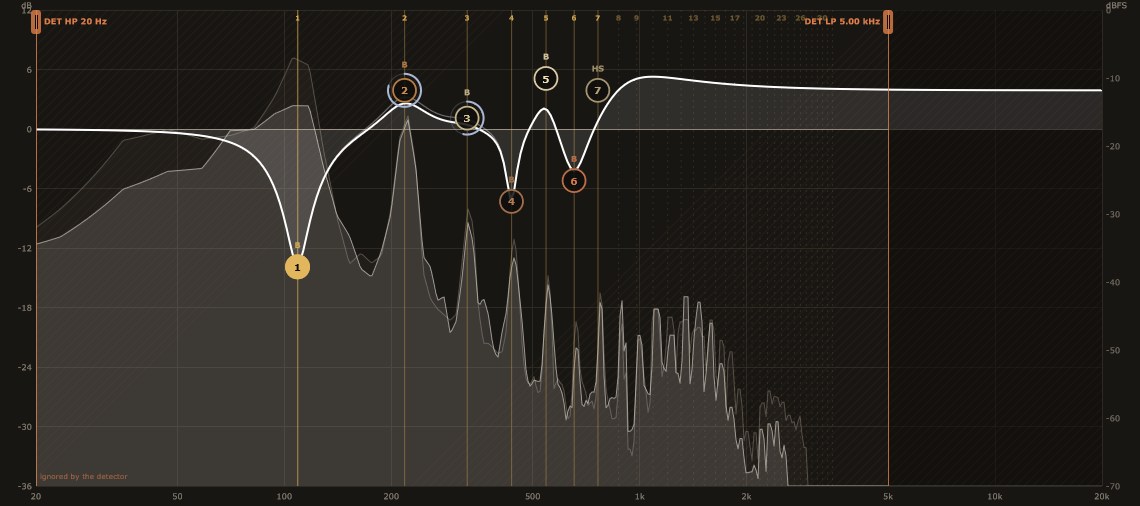
Al empezar solo existe la banda de la fundamental. En el analizador, las líneas verticales son la escalera de armónicos: sólidas donde hay banda, punteadas donde no.
At first only the fundamental band exists. In the analyser, the vertical lines are the harmonic ladder: solid where there is a band, dotted where there is not.
Detector de tonoPitch detector

- Sens
- Lo exigente que es el detector. Bajo: solo acepta notas claras. Alto: más permisivo.
- Gate
- Por debajo de este nivel no se busca nota (el audio nunca se corta). Al mínimo está apagado.
- HP / LP
- Filtros que solo ve el detector. Vienen abiertos (20 Hz – 5 kHz); ciérralos si el detector se confunde con ruido o graves.
- Freq + candado
- Al cerrar el candado la frecuencia base se queda fija (toma la nota detectada en ese momento) y Temple deja de seguir. FREQ la ajusta a mano.
- SC Pitch
- Detecta la nota desde la entrada de sidechain en vez de la propia pista. Solo afecta al seguimiento.
- Auto bypass
- Si no hay nota durante 0,7 s, el EQ se retira con una rampa y vuelve al detectarla.
- Sens
- How strict the detector is. Low: accepts only clear notes. High: more permissive.
- Gate
- Below this level no note is searched for (the audio is never cut). At minimum it is off.
- HP / LP
- Filters only the detector sees. They start open (20 Hz – 5 kHz); close them if noise or lows confuse the detector.
- Freq + lock
- Closing the lock freezes the base frequency (it takes the note detected at that moment) and Temple stops following. FREQ sets it by hand.
- SC Pitch
- Detects the note from the sidechain input instead of the track itself. Only affects tracking.
- Auto bypass
- If there is no note for 0.7 s the EQ ramps out, and comes back when it finds one.
BandasBands
Hasta 16 bandas. Añade la siguiente con el hueco + y quita una con su ×. En el analizador, arrastra un nodo en vertical para la ganancia; con la rueda cambias la Q.
Up to 16 bands. Add the next one with the + slot and remove one with its ×. In the analyser, drag a node vertically for gain; use the wheel for Q.
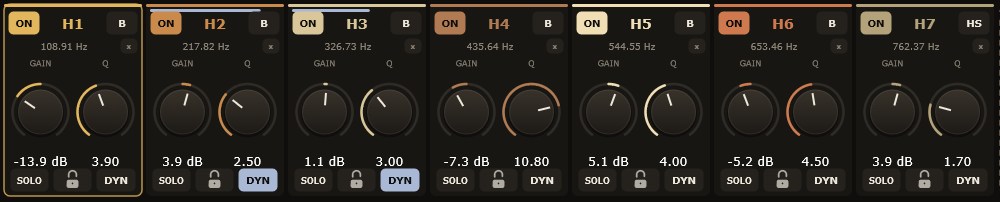
- Multiplicador
- Dónde va la banda respecto a la nota (×0.25 – ×256). Doble clic para escribirlo. Con Free Move se arrastra en horizontal con pasos de 0,01.
- Tipo
- Bell, Low Shelf, High Shelf, Notch, High Pass, Low Pass, y los dinámicos Transient, Sibilance, Background y Sustain. Clic en el nombre para cambiarlo.
- Pendiente
- Para filtros y shelves: 6, 12, 18, 24, 48 o 96 dB/oct.
- Canal
- ST (izquierda y derecha), MID (el centro) o SIDE (lo que difiere entre los lados). En el menú de la banda.
- Solo
- Oír solo esta banda.
- Candado
- Congela la frecuencia de esta banda: deja de seguir la nota y se queda donde está.
- Scale
- Multiplica la ganancia de todas las bandas (50 – 200 %).
- Multiplier
- Where the band sits relative to the note (×0.25 – ×256). Double-click to type it. With Free Move drag horizontally in 0.01 steps.
- Type
- Bell, Low Shelf, High Shelf, Notch, High Pass, Low Pass, plus the dynamic Transient, Sibilance, Background and Sustain. Click the name to change it.
- Slope
- For filters and shelves: 6, 12, 18, 24, 48 or 96 dB/oct.
- Channel
- ST (left and right), MID (the centre) or SIDE (what differs between the sides). In the band's menu.
- Solo
- Hear this band alone.
- Lock
- Freezes this band's frequency: it stops following the note and stays where it is.
- Scale
- Scales the gain of every band (50 – 200 %).
DinámicaDynamics
Con la dinámica activa, la banda solo actúa según el nivel de su zona. El panel se abre sobre el analizador para la banda seleccionada.
With dynamics on, the band only acts according to the level of its region. The panel opens over the analyser for the selected band.
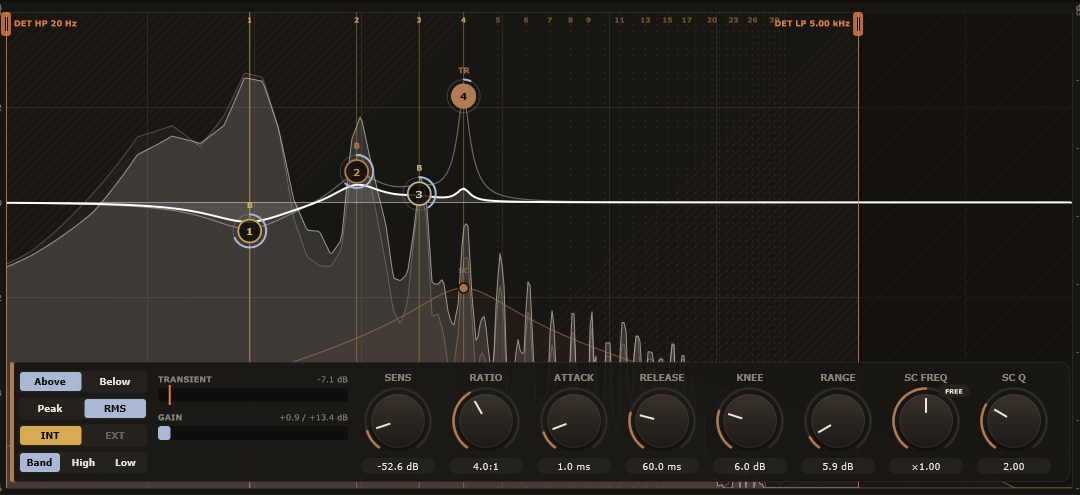
- Above / Below
- Above actúa cuando el nivel supera el threshold (de-esser, domar resonancias). Below, cuando queda por debajo (realzar solo lo débil).
- Threshold
- Nivel de la zona (dBFS) a partir del cual actúa.
- Ratio
- Cuánto responde: 1:1 nada, 20:1 casi un limitador.
- Attack / Release
- Lo que tarda en empezar y en dejar de actuar.
- Knee
- Transición suave alrededor del threshold (0 = brusca).
- Range
- Cuántos dB de reducción hacen falta para que la banda aplique su ajuste completo.
- Peak / RMS
- Peak reacciona a los picos; RMS a la energía media.
- INT / EXT
- Qué escucha el detector: la propia pista o la entrada de sidechain del DAW.
- SC Freq
- Dónde escucha, relativo a la banda: ×1 la misma, ×2 una octava arriba, ×0.5 una abajo. Salta entre ×0.25, ×0.5, ×1, ×1.5, ×2, ×3 y ×4 salvo con FREE. También se arrastra en el analizador.
- SC Q / forma
- Band escucha una campana (más Q, más estrecha); High todo lo que queda por encima; Low todo lo de debajo.
- Above / Below
- Above acts when the level goes over the threshold (de-essing, taming resonances). Below acts when it falls under it (lifting only what is weak).
- Threshold
- Level of the region (dBFS) at which it starts acting.
- Ratio
- How strongly it responds: 1:1 none, 20:1 nearly a limiter.
- Attack / Release
- How long it takes to start and to stop acting.
- Knee
- Smooth transition around the threshold (0 = abrupt).
- Range
- How many dB of reduction it takes for the band to apply its full setting.
- Peak / RMS
- Peak reacts to peaks; RMS to average energy.
- INT / EXT
- What the detector hears: the track itself or the DAW's sidechain input.
- SC Freq
- Where it listens, relative to the band: ×1 the same, ×2 an octave up, ×0.5 one down. Snaps to ×0.25, ×0.5, ×1, ×1.5, ×2, ×3 and ×4 unless FREE is on. Also draggable in the analyser.
- SC Q / shape
- Band listens to a bell (higher Q, narrower); High to everything above; Low to everything below.
Tipos dinámicos
Dynamic types
Transient y Sustain separan el golpe de la cola: con Sensibilidad eliges si reacciona a ataques pequeños o solo a los fuertes. Sibilance mide la banda frente al total de la señal: cuanto más cerca de 0 dB el threshold relativo, más tiene que destacar para tratarla como sibilante. Background actúa sobre lo que queda por debajo.
Transient and Sustain separate the hit from the tail: Sensitivity sets whether it reacts to small attacks or only strong ones. Sibilance measures the band against the whole signal: the closer the relative threshold is to 0 dB, the more it must stand out to count as sibilant. Background acts on what lies underneath.
Salida y escuchaOutput and monitoring

- Auto gain
- Compensa la subida de volumen del EQ. Se calcula con los ajustes, no sigue la señal, y solo reduce. Activado por defecto.
- Soft clip
- Redondea los picos que pasarían de 0 dBFS. Exacto por debajo de −3 dBFS, sin latencia.
- Lookahead
- Retrasa el audio 100 ms para que las bandas cambien justo con la nota. El DAW compensa el retraso; apágalo para grabar o tocar en directo.
- Escucha
- Icono de auriculares: SALIDA normal o DELTA (solo lo que el EQ añade o quita), en ST, MID o SIDE.
- Output / Mix
- Ganancia de salida (−24 a +12 dB) y mezcla con la señal original.
- Bypass
- El audio pasa sin procesar, con la misma latencia.
- Auto gain
- Compensates the level boost from the EQ. Calculated from the settings, it does not follow the signal and only reduces. On by default.
- Soft clip
- Rounds off peaks that would go over 0 dBFS. Exact below −3 dBFS, no latency.
- Lookahead
- Delays the audio by 100 ms so bands move right with the note. Your DAW compensates; turn it off to record or play live.
- Monitor
- Headphones icon: normal OUTPUT or DELTA (only what the EQ adds or removes), in ST, MID or SIDE.
- Output / Mix
- Output gain (−24 to +12 dB) and blend with the original signal.
- Bypass
- Audio passes unprocessed, with the same latency.
Presets, A/B y deshacerPresets, A/B and undo
Presets: guarda los tuyos desde el menú; van a Documentos\Martillolaud\Temple\Presets. Cargar un preset no toca el lookahead ni la escucha, y se puede deshacer.
Presets: save your own from the menu; they go to Documents\Martillolaud\Temple\Presets. Loading one leaves lookahead and monitoring alone, and can be undone.
A / B: dos ajustes completos para comparar; el botón de copiar pasa el actual al otro. Deshacer: Ctrl+Z; rehacer: Ctrl+Shift+Z o Ctrl+Y.
A / B: two complete settings to compare; the copy button sends the current one to the other. Undo: Ctrl+Z; redo: Ctrl+Shift+Z or Ctrl+Y.
Ayuda: deja el ratón sobre cualquier control para ver qué hace. El botón ES/EN cambia el idioma de la interfaz.
Help: hover over any control to see what it does. The ES/EN button switches the interface language.
PreguntasQuestions
El EQ no sigue bien la nota
The EQ does not follow the note well
Temple sigue una nota cada vez: funciona mejor en voces, bajos e instrumentos solistas que en acordes. Cierra HP/LP del detector alrededor del instrumento y sube Gate si el ruido de fondo lo despista.
Temple follows one note at a time: it works best on vocals, bass and solo instruments rather than chords. Close the detector's HP/LP around the instrument and raise Gate if background noise confuses it.
¿Por qué tiene latencia?
Why does it add latency?
Por el lookahead (100 ms). Al mezclar el DAW lo compensa; para grabar, apágalo.
Because of lookahead (100 ms). Your DAW compensates while mixing; turn it off to record.
Perdí mi serie
I lost my serial
Escríbeme a info@martillolaud.com con el correo de la compra.
Write to info@martillolaud.com with the email you bought with.