 Martillolaud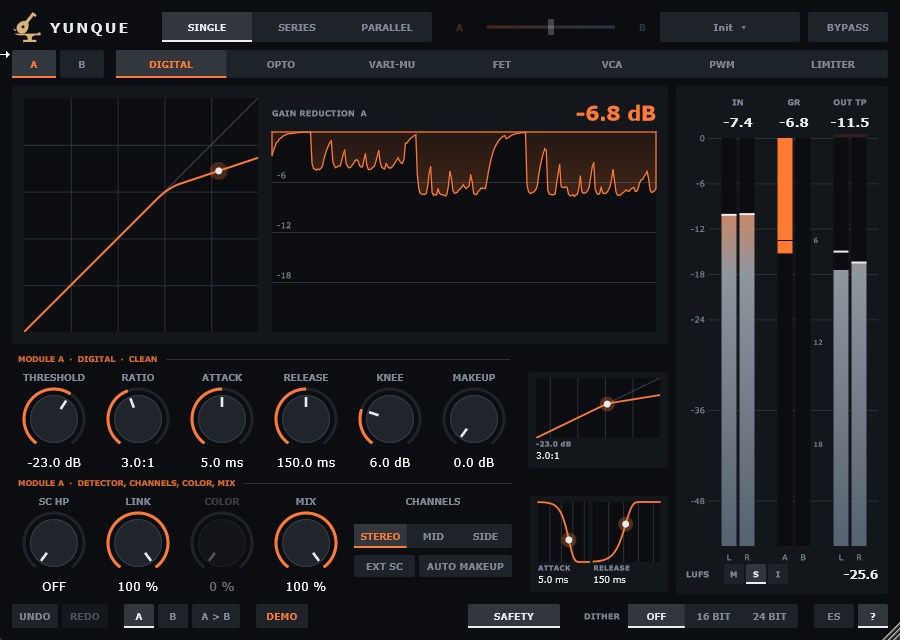
InstalaciónInstallation
- Descarga
Yunque-Windows.zipy descomprímelo. - Copia
Yunque.vst3enC:\Program Files\Common Files\VST3. - Abre tu DAW y vuelve a buscar plugins si no aparece. Yunque está bajo el fabricante Martillolaud.
- Download
Yunque-Windows.zipand unzip it. - Copy
Yunque.vst3toC:\Program Files\Common Files\VST3. - Open your DAW and rescan plugins if it does not show up. Yunque is listed under the manufacturer Martillolaud.
Activar la licenciaActivating your license
Sin licencia, Yunque funciona completo. Al abrir la ventana sale un aviso que se puede cerrar a los 10 segundos, una vez por instancia. Para quitarlo pulsa DEMO en la barra inferior y escribe el correo de la compra y la serie que te llegó. No hace falta internet. La serie de Temple no vale para Yunque: cada plugin tiene la suya.
Without a license Yunque is fully working. Opening its window shows a notice you can close after 10 seconds, once per instance. To remove it click DEMO in the bottom bar and enter your purchase email and the serial you received. No internet needed. A Temple serial does not unlock Yunque: each plugin has its own.
Módulos y enrutadoModules and routing
Yunque tiene dos módulos completos, A (color ascua) y B (color acero). A empieza en DIGITAL y B en LIMITER. Elige cómo se conectan:
Yunque has two complete modules, A (ember) and B (steel). A starts in DIGITAL and B in LIMITER. Choose how they connect:

- Single
- Solo suena A.
- Series
- A y después B; por ejemplo, un compresor y luego el limitador.
- Parallel
- A y B a la vez, mezclados con el deslizador Blend.
- Single
- Only A plays.
- Series
- A, then B; for example a compressor followed by the limiter.
- Parallel
- A and B at once, blended with the Blend slider.
Si pones LIMITER en un módulo que no va el último, la barra inferior te avisa: un limitador solo garantiza el techo si nada viene detrás.
If you put LIMITER on a module that is not last, the bottom bar warns you: a limiter only guarantees the ceiling when nothing comes after it.
Los siete modosThe seven modes
Cada modo tiene sus propios mandos y recuerda sus ajustes al cambiar de uno a otro.
Each mode has its own controls and remembers its settings when you switch.
Digital
El compresor limpio y preciso, sin color. Threshold (dónde empieza), Ratio (2:1 suave, 4:1 normal, 10:1 o más ya es limitar), Attack (corto controla picos, largo deja pasar el golpe), Release (corto da volumen y bombeo, largo es más natural), Knee (0 dB brusca, más alto más suave) y Makeup.
The clean, precise compressor, no colour. Threshold (where it starts), Ratio (2:1 gentle, 4:1 normal, 10:1 and up is limiting), Attack (short catches peaks, long lets the hit through), Release (short is louder and pumps, long is more natural), Knee (0 dB abrupt, higher is gentler) and Makeup.
Opto

Suave, de un solo mando: cuanto más subes Reduction, más comprime. Ataque fijo y liberación en dos etapas (suelta rápido la mitad y despacio el resto). Mode: COMP ≈ 3:1, LIMIT ≈ 10:1. Con DUAL aparece un segundo threshold más arriba (2nd Thresh, en dB sobre el primero) a partir del cual comprime con 2nd Ratio. Color: Warm Tube.
Smooth, one knob: the higher Reduction, the more compression. Fixed attack and two-stage release (lets go of half quickly and the rest slowly). Mode: COMP ≈ 3:1, LIMIT ≈ 10:1. DUAL adds a second, higher threshold (2nd Thresh, dB above the first) where 2nd Ratio takes over. Colour: Warm Tube.
Vari-Mu
Válvulas y pegamento. La rodilla es muy ancha: el ratio crece cuanto más fuerte es la señal. Input empuja contra el Threshold; Time Const va de 1 (rápido) a 6, y las posiciones 5 y 6 son automáticas (rápido en picos sueltos, lento en lo sostenido). Color: Rich Tube.
Tubes and glue. The knee is very wide: the ratio grows the louder the signal gets. Input pushes into the Threshold; Time Const runs from 1 (fast) to 6, and positions 5 and 6 are automatic (fast on isolated peaks, slow on sustained material). Colour: Rich Tube.
FET
Rápido y agresivo. El threshold es fijo: se comprime subiendo Input y bajando Output a la vez. Ataque de 0,02 a 0,8 ms. En Ratio, ALL es el modo de todos los botones pulsados: aplasta. Color: Transistor.
Fast and aggressive. The threshold is fixed: compress by raising Input while lowering Output. Attack from 0.02 to 0.8 ms. In Ratio, ALL is the all-buttons-in mode: it squashes. Colour: Transistor.
VCA

Compresor de bus. Ratio 2, 4 o 10. Attack y Release saltan entre las posiciones clásicas; con FREE se mueven libres. AUTO deja la liberación a la música (rápida tras un pico suelto, lenta en pasajes densos). FREE y AUTO se excluyen. Color: Soft Clip.
Bus compressor. Ratio 2, 4 or 10. Attack and Release snap to the classic positions; FREE lets them move freely. AUTO lets the music set the release (fast after an isolated peak, slow on dense passages). FREE and AUTO exclude each other. Colour: Soft Clip.
PWM
Muy rápido y de rodilla dura. Threshold, Ratio, Attack, Release y Makeup. Color: Gentle.
Very fast with a hard knee. Threshold, Ratio, Attack, Release and Makeup. Colour: Gentle.
Limiter
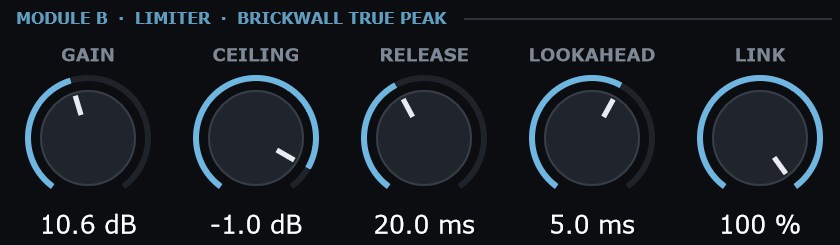
Limitador true peak: detecta el pico real con sobremuestreo ×8, así que la salida nunca pasa del techo. Gain empuja contra el techo; Ceiling es el pico real máximo de la salida; Release corto da volumen y largo limpia los graves; Lookahead va de 0,5 a 8 ms; Link al 100 % conserva la imagen estéreo.
True peak limiter: it detects the true peak with ×8 oversampling, so the output never crosses the ceiling. Gain pushes into the ceiling; Ceiling is the output's maximum true peak; short Release is louder, long keeps lows clean; Lookahead runs from 0.5 to 8 ms; Link at 100 % keeps the stereo image.
Mandos del móduloModule controls
Valen para cualquier compresor (no para LIMITER):
These apply to every compressor mode (not LIMITER):

- SC HP
- High pass en el detector: deja de reaccionar a los graves (el audio no se filtra). Evita que el bombo haga bombear la mezcla.
- EXT SC
- Escucha el sidechain externo en vez de la propia señal. Hay que enviárselo desde el DAW; sin señal no comprime.
- Link
- Enlace estéreo. 100 %: los dos canales igual. 0 %: cada uno por su cuenta (puede mover el centro).
- Channels
- STEREO todo, MID solo el centro (voz, bombo, bajo), SIDE solo los lados (ambiente, anchura).
- Color
- La saturación propia del modo; a 0 % es limpio. Su etiqueta dice qué carácter añade. DIGITAL no lleva color.
- Mix
- Mezcla con la señal original. Por debajo de 100 % es compresión paralela.
- Auto makeup
- Recupera el volumen que quita la compresión, estimado desde la curva. El mando de salida queda como ajuste fino.
- SC HP
- High-pass on the detector: stops it reacting to lows (the audio is not filtered). Keeps the kick from pumping the mix.
- EXT SC
- Listens to the external sidechain instead of its own signal. Route it from your DAW; with no signal there is no compression.
- Link
- Stereo link. 100 %: both channels alike. 0 %: each on its own (may shift the centre).
- Channels
- STEREO everything, MID centre only (vocal, kick, bass), SIDE sides only (ambience, width).
- Color
- The mode's own saturation; at 0 % it is clean. Its label names the character it adds. DIGITAL has no colour.
- Mix
- Blend with the original signal. Below 100 % is parallel compression.
- Auto makeup
- Restores the level compression takes away, estimated from the curve. The output knob becomes a fine trim.
Gráficos y medidoresGraphs and meters
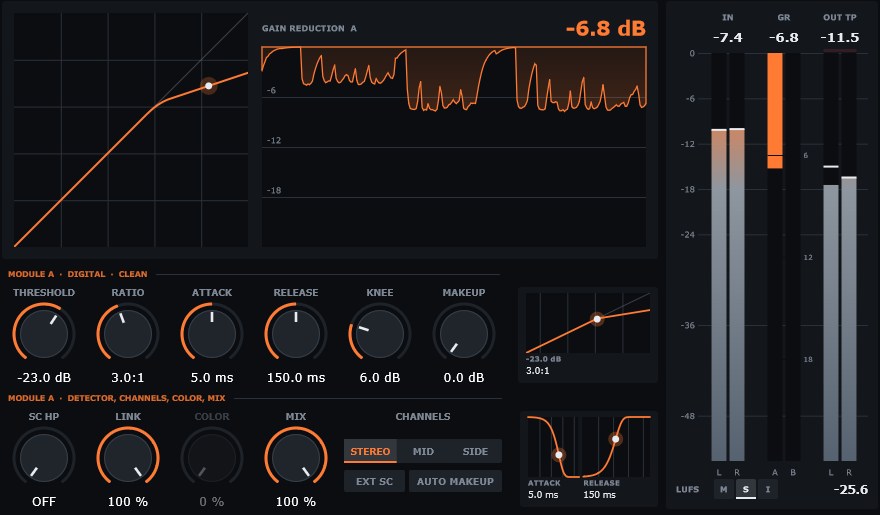
Visor: a la izquierda la curva del módulo que editas (entrada en horizontal, salida en vertical) con el nivel actual; a la derecha, cuánto reduce cada módulo con el tiempo.
Display: on the left the curve of the module you are editing (input across, output up) with the current level; on the right, how much each module reduces over time.
Curva y tiempos: dos gráficos pequeños junto a los mandos muestran el detalle de la curva y la forma del ataque y la liberación. Arrastra sus puntos para mover los mandos.
Curve and timing: two small graphs beside the controls show the curve detail and the attack and release shape. Drag their points to move the controls.
Medidores: IN (pico de entrada), GR (reducción de A y B), OUT TP (pico real de salida) y LUFS: con las letras eliges M (momentánea, 400 ms), S (corto plazo, 3 s) o I (integrada). Un clic los pone a cero.
Meters: IN (input peak), GR (reduction of A and B), OUT TP (output true peak) and LUFS: the letters pick M (momentary, 400 ms), S (short-term, 3 s) or I (integrated). Click to reset.
Barra inferiorBottom bar

- Safety
- Limitador de seguridad a 0 dBTP al final de todo, encendido por defecto. Si actúa, sale una placa roja sobre el visor: baja la salida. Al apagarlo verás SAFETY OFF en rojo.
- Bypass
- Señal sin procesar con la misma latencia, para comparar sin saltos.
- Dither
- Ruido muy bajo para exportar a 16 o 24 bits. Solo si Yunque es lo último de la cadena.
- A / B
- Dos ajustes completos del plugin para comparar (no son los módulos A y B). El botón de copiar pasa el actual al otro.
- Deshacer
- Ctrl+Z / Ctrl+Y.
- Presets
- En la cabecera: guarda los tuyos en
Documentos\Martillolaud\Yunque\Presets. No tocan bypass, SAFETY ni dither. - ES / EN · ?
- Idioma de la ayuda y encender o apagar las ayudas al pasar el ratón.
- Safety
- Safety limiter at 0 dBTP at the very end, on by default. When it acts a red plate shows over the display: lower the output. Turning it off shows SAFETY OFF in red.
- Bypass
- Unprocessed signal with the same latency, to compare without jumps.
- Dither
- Very low noise for exporting at 16 or 24 bits. Only when Yunque is last in the chain.
- A / B
- Two complete plugin settings to compare (not the A and B modules). The copy button sends the current one to the other.
- Undo
- Ctrl+Z / Ctrl+Y.
- Presets
- In the header: save your own to
Documents\Martillolaud\Yunque\Presets. They leave bypass, SAFETY and dither alone. - ES / EN · ?
- Help language, and hover hints on or off.
La ventana se puede agrandar o achicar (75 – 200 %) arrastrando la esquina; el tamaño se guarda con la sesión.
Resize the window (75 – 200 %) by dragging its corner; the size is saved with the session.
PreguntasQuestions
¿Tiene latencia?
Does it add latency?
El limitador de seguridad añade unos 4,3 ms y el modo LIMITER unos 10,7 ms a 48 kHz. El DAW lo compensa; el bypass mantiene la misma latencia.
The safety limiter adds about 4.3 ms and LIMITER mode about 10.7 ms at 48 kHz. Your DAW compensates; bypass keeps the same latency.
Aparece el aviso rojo
The red warning shows up
La salida iba a pasar de 0 dB y el limitador de seguridad la está recortando. Baja la ganancia de salida o usa un LIMITER al final.
The output was about to go over 0 dB and the safety limiter is catching it. Lower the output gain or put a LIMITER last.
Perdí mi serie
I lost my serial
Escríbeme a info@martillolaud.com con el correo de la compra.
Write to info@martillolaud.com with the email you bought with.